

Protocol Streams
Aegis includes a full protocol streaming engine alongside its HTTP reverse proxy. Streams handle raw TCP and UDP traffic — database connections, game servers, mail relays, SSH tunnels, DNS forwarding, VPN endpoints, or any non-HTTP protocol that needs port-level proxying with access control.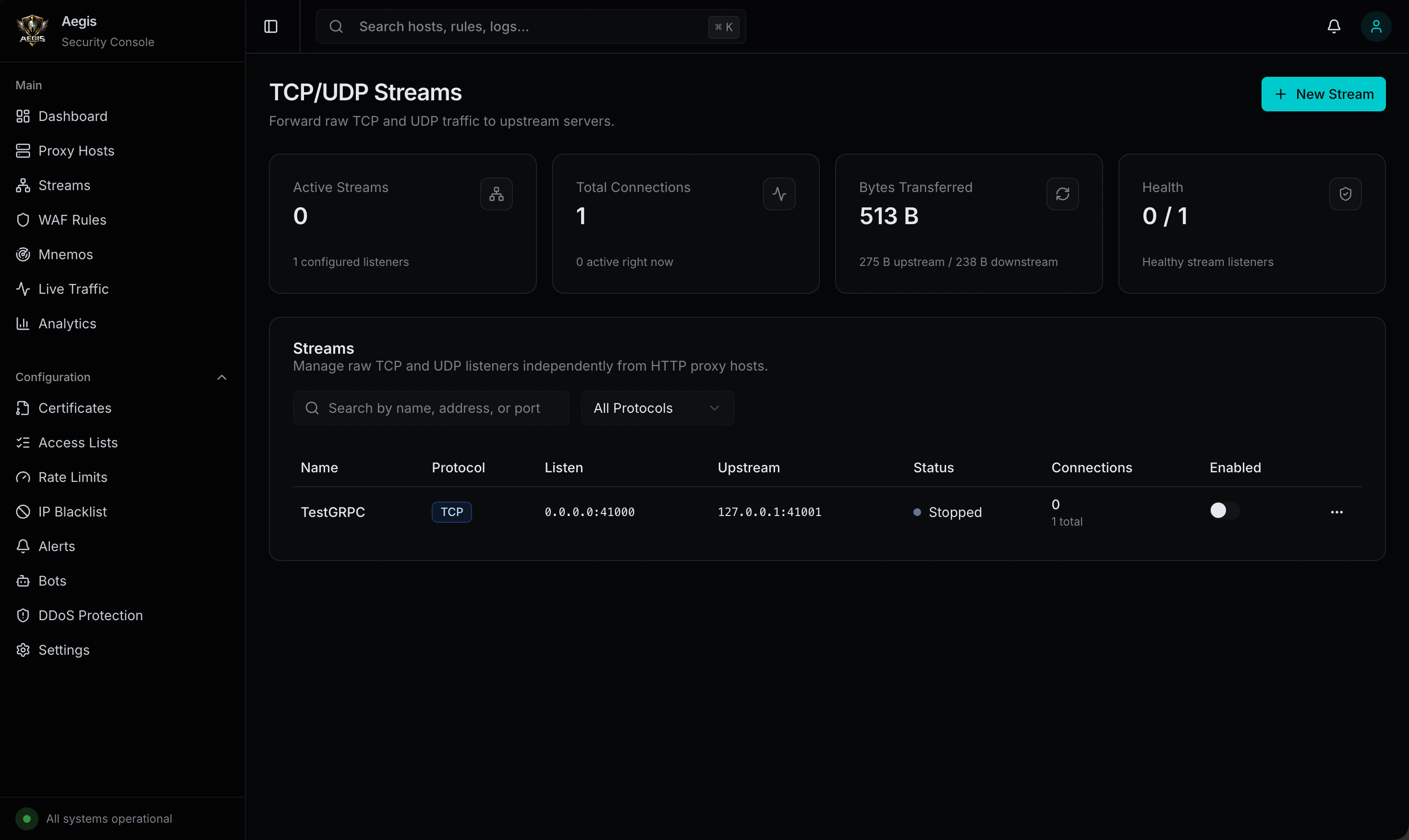
Overview
Streams operate at Layer 4 (transport), forwarding raw bytes between clients and upstreams without HTTP awareness. Each stream binds to a listen address and port, relays traffic to an upstream host and port, and optionally applies TLS termination, access control, bandwidth limits, and health checks.Host header), streams route by listen port — each stream owns a unique port.
Protocols
| Protocol | Description |
|---|---|
| TCP | Reliable connection-oriented streaming with bidirectional relay |
| UDP | Connectionless datagram forwarding with stateful NAT table |
| TCP+UDP | Both protocols on the same port (separate listeners) |
Stream Configuration
Each stream host supports the following settings:| Setting | Type | Description |
|---|---|---|
name | string | Human-readable name for the stream |
protocol | string | tcp, udp, or tcp+udp |
listen_address | string | Bind address (e.g., 0.0.0.0, 127.0.0.1) |
listen_port | integer | Port to listen on (1–65535) |
upstream_host | string | Upstream server hostname or IP |
upstream_port | integer | Upstream server port |
enabled | boolean | Toggle stream on/off |
max_connections | integer | Maximum concurrent connections (0 = unlimited) |
connection_timeout_seconds | integer | TCP dial timeout to upstream |
idle_timeout_seconds | integer | Close connection after idle period |
proxy_protocol_version | integer | Proxy Protocol version: 0 (off), 1, or 2 |
whitelist_cidrs | array | Allowed source IP CIDRs (empty = allow all) |
blacklist_cidrs | array | Blocked source IP CIDRs |
ssl_enabled | boolean | Enable TLS termination on the listener |
ssl_cert_id | integer | Certificate ID for TLS (from the certificate store) |
upload_rate_bytes | integer | Max upload bandwidth in bytes/sec (0 = unlimited) |
download_rate_bytes | integer | Max download bandwidth in bytes/sec (0 = unlimited) |
health_check_enabled | boolean | Enable periodic upstream health checks |
health_check_interval_seconds | integer | Health check interval |
log_connections | boolean | Log connection events (connect, disconnect, bytes transferred) |
notes | string | Free-form notes |
TCP Streaming
TCP streams use bidirectional relay — two goroutines runningio.Copy in parallel, one for each direction. When either direction completes (client closes or upstream closes), both sides are torn down.
Connection Lifecycle
- Client connects to the stream’s listen port
- Source IP checked against whitelist/blacklist CIDRs
- If TLS enabled, TLS handshake with the configured certificate
- Middleware chain runs (proxy protocol injection, connection counting, logging)
- TCP connection opened to upstream host:port
- Bidirectional relay starts (two
io.Copygoroutines) - Connection closed when either side disconnects or idle timeout triggers
- Connection stats recorded (bytes sent/received, duration)
UDP Streaming
UDP streams use a stateful NAT table to track client-to-upstream mappings. Since UDP is connectionless, Aegis maintains per-client state to correctly route response datagrams back to the originating client.NAT Table
| Field | Description |
|---|---|
upstreamConn | Dedicated UDP connection to upstream for this client |
clientAddr | Client’s source address for return routing |
sourceIP | Parsed client IP for access control |
lastActive | Timestamp of last activity (for timeout eviction) |
bytesSent / bytesRecv | Per-client traffic counters |
TLS Termination
Streams support TLS termination on the listener side, using certificates from the Aegis certificate store (the same certificates used for HTTP proxy hosts).- Set
ssl_enabled: trueand provide anssl_cert_idreferencing a stored certificate - TLS is only supported on TCP (and the TCP portion of TCP+UDP)
- The upstream connection is plain TCP — TLS is terminated at Aegis
Proxy Protocol
Streams support the PROXY protocol for passing the original client IP to the upstream server.| Version | Description |
|---|---|
0 | Disabled (default) |
1 | Human-readable text format (HAProxy v1) |
2 | Binary format (HAProxy v2) |
Access Control
Each stream has its own whitelist and blacklist CIDR lists, evaluated on every new connection:- If whitelist is non-empty, only IPs matching a whitelist entry are allowed
- If the IP matches a blacklist entry, the connection is rejected
- Rejected connections are logged (if connection logging is enabled)
Bandwidth Limiting
Per-stream upload and download rate limits are enforced in bytes per second:| Setting | Description |
|---|---|
upload_rate_bytes | Max client-to-upstream throughput (bytes/sec) |
download_rate_bytes | Max upstream-to-client throughput (bytes/sec) |
0 for unlimited. Rate limiting is applied per-connection via IO wrappers.
Health Checks
When enabled, Aegis periodically verifies that the upstream is reachable:- A TCP dial to
upstream_host:upstream_portis attempted at the configured interval - If the dial succeeds, the stream is marked healthy
- If the dial fails, the stream is marked unhealthy and the error is recorded
- Health status is visible in the admin UI and via the stats API
Connection Logging
Whenlog_connections is enabled, Aegis records each connection:
| Field | Description |
|---|---|
source_ip | Client IP address |
bytes_sent | Bytes transferred client → upstream |
bytes_received | Bytes transferred upstream → client |
duration_ms | Connection duration in milliseconds |
action | allowed or blocked |
disconnect_reason | Why the connection ended (idle timeout, client close, upstream close, etc.) |
Runtime Statistics
Each stream exposes real-time counters:| Stat | Description |
|---|---|
listening | Whether the listener is active |
healthy | Upstream health check status |
active_connections | Current open connections |
total_connections | Total connections since last reload |
bytes_sent | Total bytes client → upstream |
bytes_received | Total bytes upstream → client |
Port Validation
Aegis validates stream ports before binding:- Port must be between 1 and 65535
- Port must not conflict with the HTTP proxy (
:80), HTTPS proxy (:443), or admin UI (9443) - Port must not conflict with another stream’s listen port
- Warnings are issued for well-known reserved ports
Admin UI
Streams have their own management page in the Aegis admin dashboard:- Create, edit, enable/disable, and delete streams
- Real-time connection stats and health status
- Connection log viewer
- Protocol, TLS, and access control configuration
- Bandwidth and timeout settings
API Reference
| Method | Path | Description |
|---|---|---|
GET | /api/v1/streams | List all stream hosts with runtime status |
POST | /api/v1/streams | Create a new stream host |
GET | /api/v1/streams/{id} | Get a stream host by ID |
PUT | /api/v1/streams/{id} | Update a stream host |
DELETE | /api/v1/streams/{id} | Delete a stream host |
GET | /api/v1/streams/stats | Get runtime stats for all streams |
POST | /api/v1/streams/validate-port | Validate a port before binding |