

SSL/TLS Certificates
Aegis manages SSL/TLS certificates for all proxy hosts. It supports three certificate sources: Let’s Encrypt (automatic ACME), Cloudflare Origin CA (API-integrated), and Custom (manual PEM upload). Private keys are encrypted at rest using AES-256-GCM.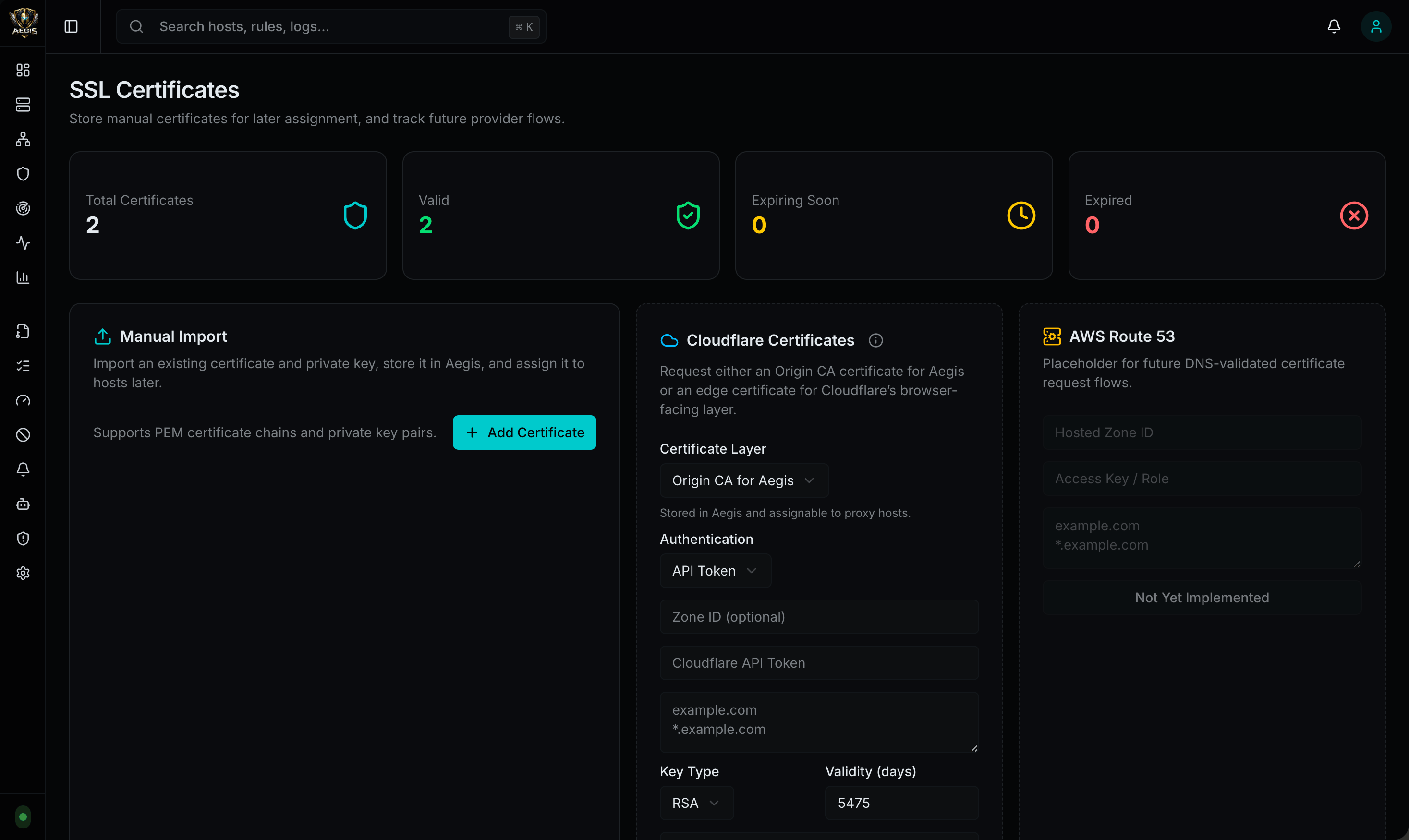
Certificate Sources
| Source | Mode | Description |
|---|---|---|
| Let’s Encrypt | letsencrypt | Automatic certificate issuance and renewal via ACME HTTP-01 challenge |
| Cloudflare Origin CA | custom (source: cloudflare_origin) | Origin certificates issued through the Cloudflare API |
| Custom Upload | custom | Manual PEM-encoded certificate and key upload |
| Self-Signed Fallback | automatic | Generated automatically when no other certificate is available for a host |
Let’s Encrypt (ACME)
Aegis uses Go’sautocert library to obtain and renew Let’s Encrypt certificates automatically via the ACME HTTP-01 challenge.
How It Works
- Set the proxy host’s SSL mode to
letsencryptin the admin UI - Aegis validates that the domain is configured as a proxy host (host policy check)
- When a TLS handshake arrives for that domain,
autocertrequests a certificate from Let’s Encrypt - The HTTP-01 challenge is served on port 80 (the HTTP proxy listener handles
/.well-known/acme-challenge/paths) - The certificate is cached in the autocert cache directory (default
.cache/ssl) - Renewal happens automatically before expiration
Requirements
- Port 80 must be reachable from the internet for HTTP-01 challenge validation
- The domain must resolve to the Aegis server’s public IP
- The proxy host must have
ssl_modeset toletsencrypt
Configuration
| Setting | Default | Description |
|---|---|---|
AEGIS_SSL_CACHE_DIR | .cache/ssl | Directory for autocert’s file-based certificate cache |
Cloudflare Origin CA
Aegis can request Cloudflare Origin CA certificates directly through the Cloudflare API. This is ideal when Aegis sits behind Cloudflare’s proxy, where Let’s Encrypt HTTP-01 challenges may not reach the origin server.How It Works
- Aegis generates a CSR (Certificate Signing Request) with the requested hostnames
- The CSR is submitted to Cloudflare’s Origin CA API (
/client/v4/certificates) - Cloudflare issues a signed certificate (valid up to 15 years)
- Aegis stores the certificate and encrypted private key in SQLite
- The certificate is loaded into the TLS configuration for SNI-based selection
Authentication Methods
| Method | Header | Description |
|---|---|---|
api_token | Authorization: Bearer <token> | Cloudflare API Token with Origin CA permissions |
origin_ca_key | X-Auth-User-Service-Key: <key> | Cloudflare Origin CA Key (found in the Cloudflare dashboard under API Tokens) |
Request Options
| Field | Default | Description |
|---|---|---|
hostnames | (required) | Domain names for the certificate (e.g., ["app.example.com", "*.example.com"]) |
request_type | origin-rsa | Key type — origin-rsa (RSA 2048) or origin-ecc (ECDSA P-256) |
requested_validity | 5475 | Certificate validity in days (default: 15 years) |
zone_id | (optional) | Cloudflare Zone ID (for audit/tracking) |
API Endpoint
Custom Certificate Upload
Upload any PEM-encoded certificate and private key pair through the admin UI or API.API Endpoint
Validation
- The certificate and key must form a valid X.509 key pair
- The leaf certificate is parsed to extract the issuer, expiration, and subject
- The private key is encrypted with AES-256-GCM before storage
Assigning Certificates to Hosts
Certificates are assigned to proxy hosts through the host configuration:Let’s Encrypt
Setssl_mode to letsencrypt on the proxy host. No certificate ID is needed — autocert handles issuance automatically.
Custom / Cloudflare Origin
Setssl_mode to custom and either:
- Inline PEM — provide
ssl_cert_pemandssl_key_pemdirectly in the host update (Aegis stores and encrypts them automatically) - Certificate ID — reference an existing certificate by
ssl_cert_id
Cloudflare Edge Certificates
In addition to Origin CA certificates (which live on the origin server), Aegis can request Cloudflare Edge Certificates through the Cloudflare API. Edge certificates are served by Cloudflare’s edge network on behalf of your domain — useful when you need Cloudflare to provision and serve a publicly trusted certificate (e.g., for advanced certificate packs, custom hostnames, or alternative CAs).API Endpoint
Options
| Field | Default | Description |
|---|---|---|
api_token | (required) | Cloudflare API token with SSL and Certificates Write permissions |
zone_id | (required) | Cloudflare Zone ID |
hostnames | (required) | Domain names for the edge certificate |
certificate_authority | lets_encrypt | CA to issue the edge cert: lets_encrypt, google, or ssl_com |
validation_method | txt | Domain validation method: txt, http, or email |
validity_days | 90 | Certificate validity in days |
cloudflare_branding | (optional) | Enable Cloudflare branding on the certificate |
Local Certificate Authority (Trust Bundle)
Aegis generates its own local Certificate Authority on first run. This CA is used to sign self-signed certificates for the admin UI and proxy fallback TLS. The CA is stored in the SSL cache directory alongside the certificates it issues.CA Files
| File | Purpose | Validity |
|---|---|---|
aegis-local-ca.crt | CA certificate (public) | 10 years |
aegis-local-ca.key | CA private key (ECDSA P-256) | — |
admin-ui-self-signed.crt | Admin UI TLS certificate (signed by CA) | 1 year |
admin-ui-self-signed.key | Admin UI TLS key | — |
proxy-self-signed.crt | Proxy fallback TLS certificate (signed by CA) | 1 year |
proxy-self-signed.key | Proxy fallback TLS key | — |
Why Trust the CA?
When you first access the Aegis admin UI athttps://127.0.0.1:9443, your browser will show a certificate warning because the self-signed certificate is not trusted by default. You can either click through the warning each time, or trust the Aegis local CA once to permanently eliminate the warning.
The same applies to the proxy fallback certificate — if a proxy host has no Let’s Encrypt or custom certificate configured, Aegis serves a self-signed certificate signed by the local CA.
Downloading the Trust Bundle
Aegis provides a downloadable trust bundle containing the CA certificate and installation instructions for every major platform:| File | Description |
|---|---|
aegis-local-ca.crt | The CA certificate in PEM format |
README.txt | Step-by-step installation instructions |
Installing the CA Certificate
macOS:- Open Settings -> Privacy & Security -> Certificates -> View Certificates
- Import
aegis-local-ca.crtunder the Authorities tab - Check “Trust this CA to identify websites”
Certificate Renewal
| Certificate | Validity | Renewal |
|---|---|---|
| Local CA | 10 years | Regenerated only if deleted from the cache directory |
| Admin UI cert | 1 year | Automatically regenerated on next startup if expired or missing |
| Proxy fallback cert | 1 year | Automatically regenerated on next startup if expired or missing |
SNI Certificate Selection
When a TLS handshake arrives, Aegis selects the certificate in this order:- Host binding — if the proxy host has an
ssl_cert_id, use that certificate - Domain match — check all stored custom certificates for a domain match
- Autocert — attempt Let’s Encrypt certificate retrieval (for hosts with
ssl_mode: letsencrypt) - Self-signed fallback — generate a self-signed certificate covering all configured domains
Private Key Encryption
All private keys are encrypted at rest using AES-256-GCM:- Key source — provided via
AEGIS_SSL_KEY(64-char hex string) or auto-generated on first run - Auto-generated keys are stored in the SQLite
settingstable - Each key gets a unique random nonce (GCM nonce size)
- Decryption happens only when loading certificates into memory at startup or after a reload
Certificate Lifecycle
| Event | Behavior |
|---|---|
| Host created with Let’s Encrypt | Certificate requested on first TLS handshake |
| Host created with custom cert | Certificate stored immediately, proxy reloaded |
| Cloudflare Origin requested | CSR generated, sent to Cloudflare API, cert stored |
| Certificate approaches expiry | Let’s Encrypt: auto-renewed by autocert. Custom/Cloudflare: manual renewal required |
| Certificate deleted | Only allowed if not assigned to any host. Proxy reloaded after deletion |
| Host SSL mode changed | Certificate binding updated, proxy reloaded |
Host SSL Settings
Each proxy host supports these SSL-related settings:| Setting | Description |
|---|---|
ssl_mode | none, letsencrypt, or custom |
ssl_cert_id | Reference to a stored certificate (for custom mode) |
force_https | 301 redirect HTTP to HTTPS |
hsts_enabled | Enable Strict Transport Security header |
hsts_max_age | HSTS max-age in seconds |
hsts_include_subdomains | Include subdomains in HSTS |
hsts_preload | Add preload directive to HSTS |
tls_min_version | Minimum TLS version (default: TLS 1.2) |
API Reference
| Method | Path | Description |
|---|---|---|
GET | /api/v1/certificates | List all stored certificates (domains, source, issuer, expiry) |
POST | /api/v1/certificates | Upload a custom certificate (PEM cert + key) |
DELETE | /api/v1/certificates/{id} | Delete a certificate (fails if assigned to a host) |
POST | /api/v1/certificates/cloudflare-origin | Request a Cloudflare Origin CA certificate |
POST | /api/v1/certificates/cloudflare-edge | Order a Cloudflare Edge certificate |
GET | /api/v1/settings/admin-trust-bundle | Download the local CA trust bundle (ZIP) |
Certificate Object
| Field | Type | Description |
|---|---|---|
id | integer | Certificate ID |
domains | array | Domain names covered by the certificate |
source | string | custom, cloudflare_origin, or letsencrypt |
issuer | string | Certificate issuer common name |
expires_at | string | ISO 8601 expiration timestamp |
auto_renew | boolean | Whether the certificate was marked for auto-renewal |
created_at | string | ISO 8601 creation timestamp |