

Custom Error Pages
Aegis renders branded error pages when the upstream returns an error or is unreachable. Each proxy host can define status-specific HTML templates, branding, and contact information — or use the built-in default template.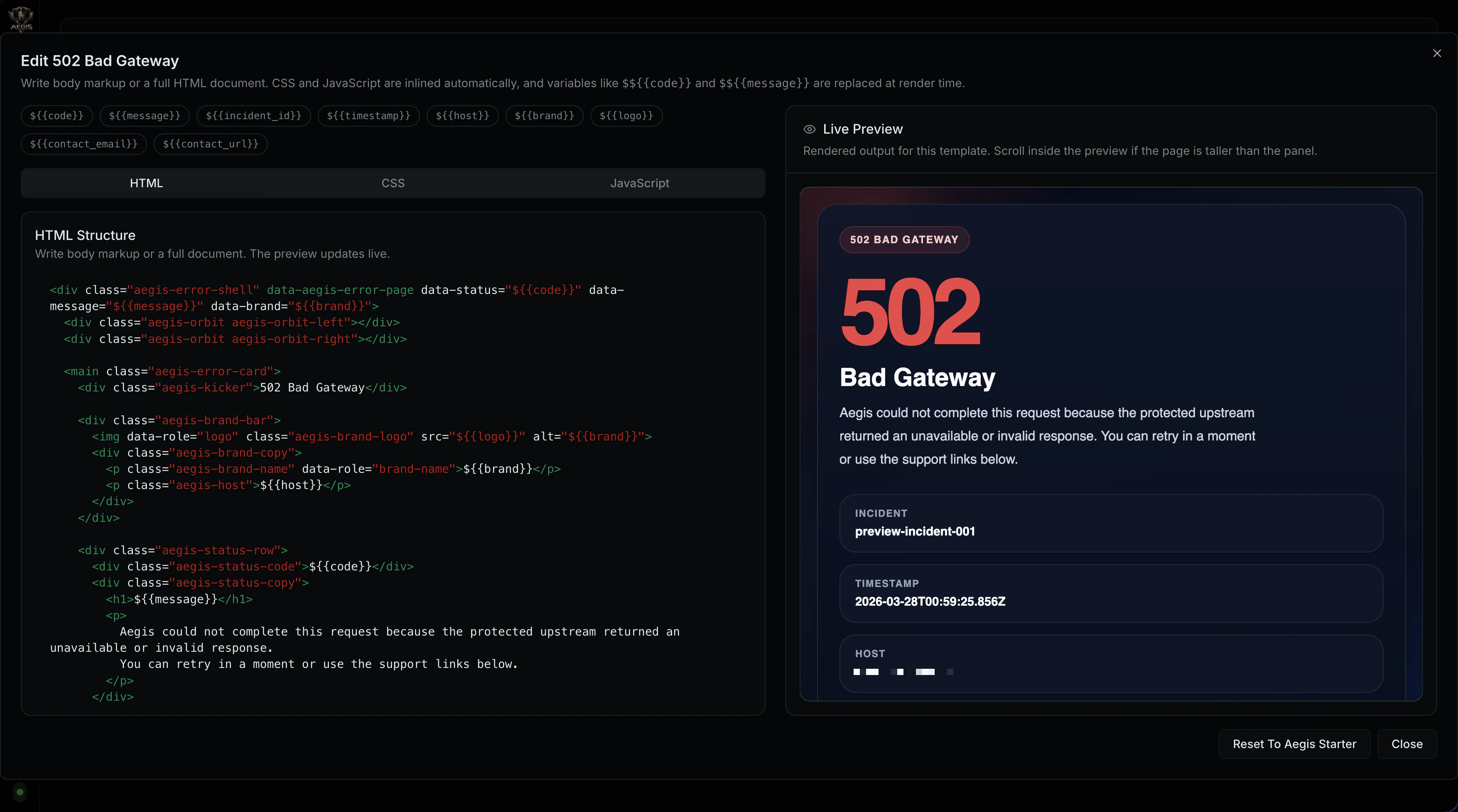
Features
| Feature | Details |
|---|---|
| Per-host configuration | Each proxy host has its own error page settings |
| Status-specific templates | Custom HTML for 502, 503, and 504 with a generic fallback |
| Template variables | Dynamic substitution of status code, incident ID, timestamp, host, and branding |
| CSS and JavaScript injection | Separate CSS and JS fields injected into the template document |
| Branding | Configurable brand name, logo URL, and accent color |
| Contact information | Optional contact email and reporting URL |
| Metadata display | Toggle incident ID and timestamp visibility |
| Security headers | Error responses include the same security headers as normal responses |
| HSTS | Error responses respect per-host HSTS configuration |
| Request ID | Aegis request ID is included in the response headers |
How It Works
When custom error pages are enabled for a host and the response status is 400 or higher:- Aegis selects the template matching the status code (502, 503, 504) or falls back to the generic template
- If a custom template exists, Aegis renders it with variable substitution and CSS/JS injection
- If no custom template exists, Aegis renders the built-in default error page with the host’s branding settings
- The original upstream response body is replaced with the rendered error page
Configuration
Error page configuration is stored as part of the proxy host settings:| Setting | Type | Description |
|---|---|---|
enabled | boolean | Enable custom error pages for this host |
custom_502 | template | Custom template for 502 Bad Gateway |
custom_503 | template | Custom template for 503 Service Unavailable |
custom_504 | template | Custom template for 504 Gateway Timeout |
custom_generic | template | Fallback template for all other error status codes |
contact_email | string | Support email address displayed on the error page |
contact_url | string | URL for reporting issues |
show_incident_id | boolean | Display the Aegis request ID on the error page |
show_timestamp | boolean | Display the error timestamp |
brand_name | string | Brand name displayed on the error page |
brand_logo_url | string | Logo URL (https:// or data:image/ URI) |
accent_color | string | CSS color value for the accent color (default: #ef4444) |
| Field | Type | Description |
|---|---|---|
html | string | HTML content (full document or fragment) |
css | string | CSS injected into <head> |
javascript | string | JavaScript injected before </body> |
Template Variables
Custom templates support variable substitution in two formats:| Variable | Alias | Description |
|---|---|---|
${{code}} | {{STATUS_CODE}} | HTTP status code (e.g., 502) |
${{message}} | {{STATUS_TEXT}} | HTTP status text (e.g., Bad Gateway) |
${{incident_id}} | {{INCIDENT_ID}} | Aegis request ID for support reference |
${{timestamp}} | {{TIMESTAMP}} | Error timestamp in RFC 3339 format |
${{host}} | {{HOST}} | Proxy host domain |
${{brand}} | — | Configured brand name |
${{logo}} | — | Configured brand logo URL |
${{contact_email}} | — | Configured contact email |
${{contact_url}} | — | Configured contact URL |
Template Rendering
Aegis handles two template formats:Full HTML Documents
If the HTML contains<html, <head, or <body tags, Aegis treats it as a full document:
- CSS is injected as a
<style>block before</head> - JavaScript is injected as a
<script>block before</body>
HTML Fragments
If the HTML is a fragment (no document structure), Aegis wraps it in a proper document with<meta charset> and viewport tags, injecting CSS and JS in the appropriate locations.
Default Template
When no custom template matches the status code, Aegis renders a built-in error page with the following design:- Dark theme with radial gradient background
- Glassmorphic panel design (backdrop blur, semi-transparent background)
- Large status code display with configurable accent color
- Status text and human-readable error description
- Metadata pills for host, incident ID, and timestamp
- Contact email and issue-reporting link
- Responsive layout (max width 640px)
- IBM Plex Sans / Segoe UI font stack
Template Selection
Aegis selects templates in the following priority order:- Status-specific template —
custom_502,custom_503, orcustom_504if it has content - Generic template —
custom_genericif it has content - Default template — built-in Aegis error page with host branding
html, css, or javascript fields are non-empty.
Security
- Logo URL sanitization — only
https://,http://, anddata:image/URIs are allowed; all other schemes are rejected - Contact URL sanitization — only
http://andhttps://URLs are allowed - Security headers — error responses include the same security headers configured for the host
- HSTS — error responses include
Strict-Transport-Securityif enabled for the host - Response cleanup —
Content-Encoding,Content-Range,ETag, andLast-Modifiedheaders are stripped from replaced responses
Error Status Mapping
When the upstream is unreachable, Aegis maps the proxy error to the appropriate status:| Error type | Status code |
|---|---|
| Context deadline exceeded | 504 Gateway Timeout |
| Network timeout | 504 Gateway Timeout |
| All other errors | 502 Bad Gateway |