

The Tale of Krkn
Krkn was born out of years of frustration doing hash cracking the “normal” way in real offensive security engagements. At KrakenTech, we’ve lived the reality of shared cracking boxes, waiting in line for access, copying hashes around withscp, downloading them off attack infrastructure, and manually relocating them onto whatever GPU rig happened to be free. We’ve all babysat hashcat processes, repeatedly checking status, waiting for a job to finish so we could tell the next person, “It’s free now.”
We’ve also suffered through the operational friction: awkward web interfaces, clunky authentication, trying to interact with browser-based tooling from headless servers, or resorting to curl and ad-hoc scripts just to move files and results around.
This workflow doesn’t scale. It wastes time, breaks focus, and turns what should be an automated, background process into a constant manual coordination problem.
We’ve been there. So we decided to redesign what hash cracking should look like.
Krkn is the result: a distributed, fault-tolerant hash cracking platform designed for real offensive security teams. It removes the need to manually shuttle files, wait for machines, or babysit jobs. Work can be batched intelligently based on flags and job characteristics, dispatched across multiple cracking nodes, and results are fed back automatically to the people who need them when they’re ready.
Instead of managing infrastructure and process, you focus on the engagement. Krkn handles the rest.
Your Data is Always Yours
Krkn is designed first and foremost as a fully offline, on-premises platform. In offensive security, the data you collect is sensitive by nature. It should never have to leave your environment, and it should never belong to anyone but you. Krkn does not require cloud services, external APIs, or third-party infrastructure. Everything runs inside your network, under your control. To protect data at rest, Krkn includes a built-in encrypted key-value store backed by BadgerDB. Stored data is encrypted using keys derived from machine-specific hardware information, rotated every 24 hours, making the database useless if it is copied off the system or stolen. Your data stays local. Your data stays encrypted. Your data stays yours.More Information
Server (krkns)
Client (krknc)
Worker (tentacle)
Licensing
To support Krkn as a fully offline, on-prem solution, licensing is handled through a signedlicense.json file. This file is required for the Krkn server to start and operate.
The license file contains an expiration date for the Krkn server. If the license expires, the server will stop accepting and processing new work. No data is deleted, modified, or removed. Your hashes, results, and metadata remain fully intact and accessible on disk.
This is a deliberate design choice: licensing should never put your data at risk.
To restore service, obtain a new license file from KrakenTech LLC, place it in the `~/.config/krkn` directory as the Krkn server binary, and restart the server. Once the new license is loaded, normal operation resumes immediately.
Krkn never needs to “phone home,” never requires internet access, and never depends on external services to validate licensing.
Network
Krkn is designed from the ground up to operate across secure, private networks. The Krkn server and clients work seamlessly over VPNs and include native integration with Tailscale for simple, secure connectivity between distributed cracking nodes and operators. All communication happens over routable, private addresses inside encrypted tunnels. This allows teams to run distributed cracking operations from a CLI without ever exposing services to the public internet. Just as importantly, Krkn is built to eliminate unsafe data movement patterns. There is no need to download client data to laptops, copy files between hosts, or manually upload hash sets to cracking servers. Hashes, jobs, and results stay inside the secure network and move only through encrypted channels between trusted nodes. This reduces operational friction and removes an entire class of risk: forgotten client data on employee machines, stray files in home directories, or sensitive material living outside controlled infrastructure. Krkn keeps the workflow centralized, encrypted, and contained - by design.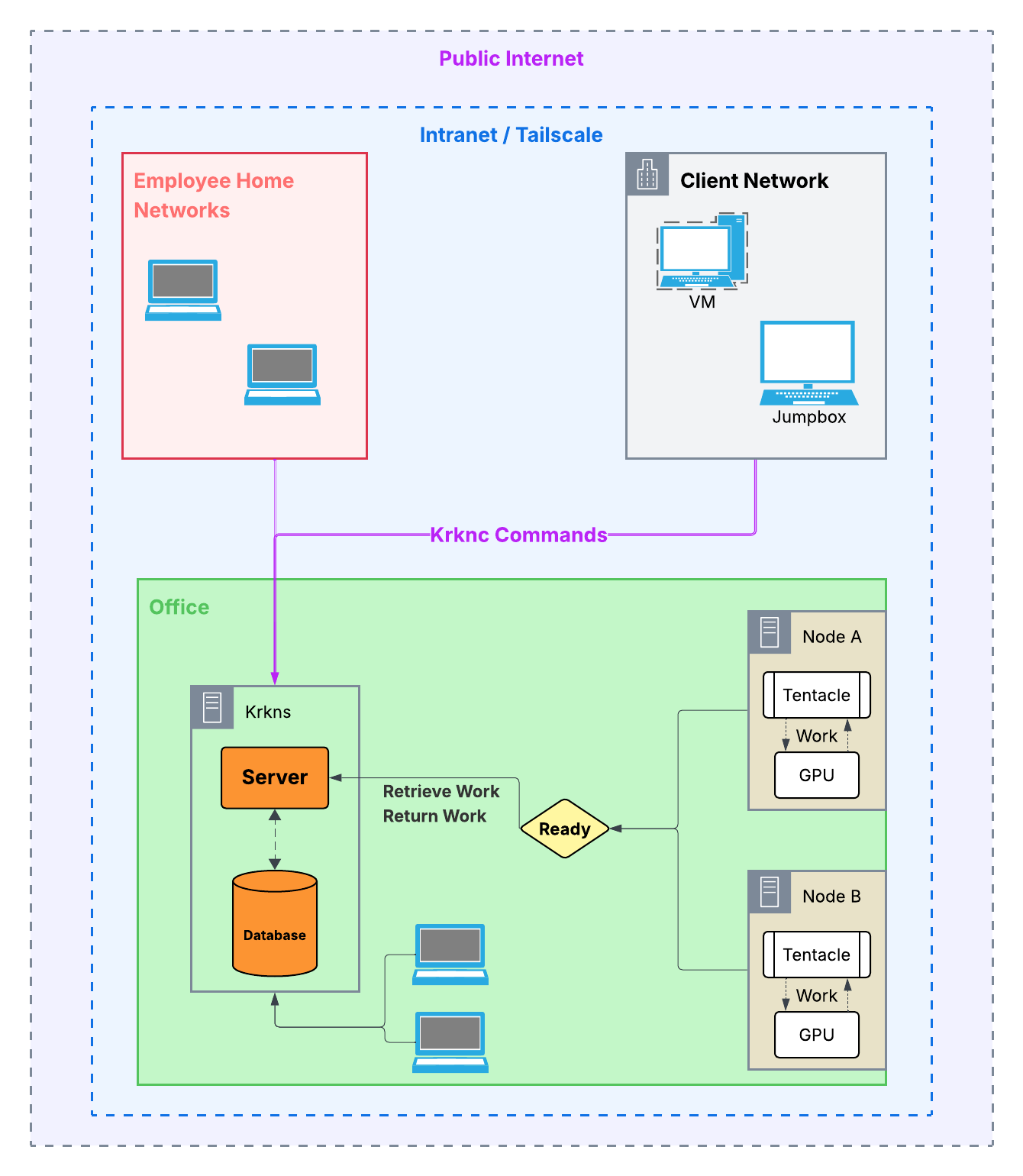Network Diagram