

Defense Schemas
Defense Schemas let you ingest an OpenAPI 3.x or Swagger 2.0 specification for any proxy host. Aegis parses the spec and auto-generates a set of per-endpoint defense rules that define what is structurally allowed — valid paths, HTTP methods, content-types, parameter names and types, and JSON request body shape. Requests that don’t conform to the schema are blocked or logged depending on the enforcement mode. Defense schema rules are separate from WAF rules. WAF rules detect malicious payloads within requests. Defense schema rules define what a valid request looks like in the first place. Both systems run — defense schemas enforce structure, WAF rules enforce content.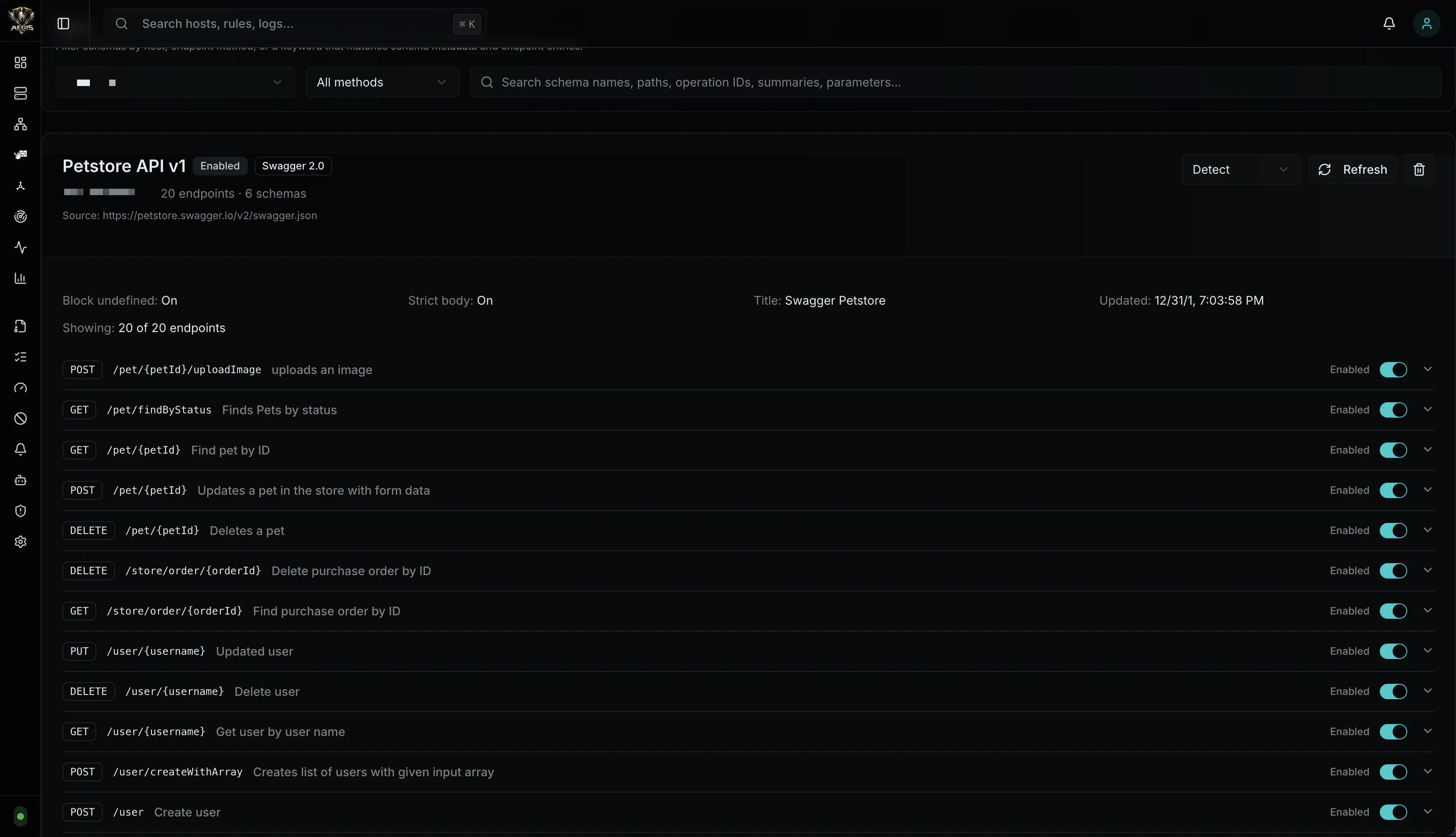
How It Works
- You upload an OpenAPI or Swagger spec (file or URL)
- Aegis parses the spec, walks every endpoint, and generates a defense rule per path+method
- Rules are stored in SQLite and compiled into a fast lookup map during reload
- At request time, Aegis looks up the path in the map and validates the request against the matched rule
Supported Formats
| Format | Version | Detection |
|---|---|---|
| OpenAPI | 3.0.x, 3.1.x | openapi field starts with 3. |
| Swagger | 2.0 | swagger field equals "2.0" |
Ingestion
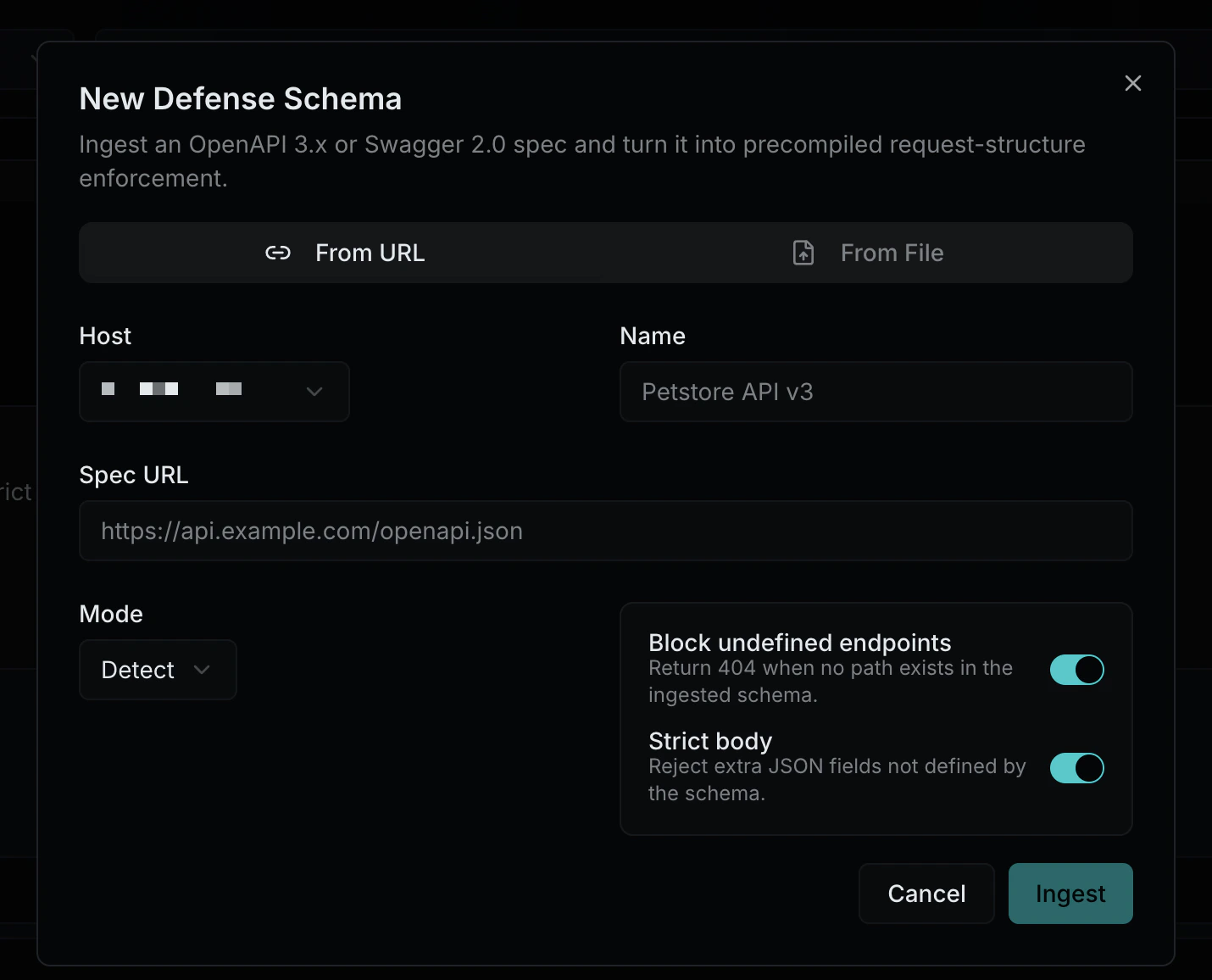
From File
Upload a.json or .yaml spec file through the admin UI. Drag-and-drop or click-to-browse
From URL
Provide an HTTP/HTTPS URL to the spec. Aegis fetches, parses, and stores the spec. The URL is saved so you can refresh the schema later to pick up spec changes. Common spec URLs:/openapi.json/swagger.json/api-docs/v3/api-docs/.well-known/openapi.json
What Gets Extracted
For each endpoint (path + method) in the spec, Aegis generates a defense rule containing:| Component | Source | Example |
|---|---|---|
| Path pattern | Spec path | /users/{id}/posts |
| HTTP method | Operation | POST |
| Content-types | Request body content map (v3) or consumes (v2) | application/json |
| Path parameters | Parameter definitions with in: path | id (integer) |
| Query parameters | Parameter definitions with in: query | page (integer, required) |
| Header parameters | Parameter definitions with in: header | X-Api-Version (string) |
| Body schema | Request body JSON schema | Properties, types, required fields, enums |
Enforcement Modes
Each defense schema has its own mode, independent of the host’s WAF mode:| Mode | Behavior |
|---|---|
| Enforce | Block requests that violate the schema. Returns the appropriate HTTP status code (400, 404, 405, 415). |
| Detect | Log violations but allow the request through. Violations appear in traffic logs with category defense_schema. |
| Off | Schema is stored but not evaluated at runtime. |
What Gets Validated
When a request arrives and matches a defense schema endpoint:| Check | HTTP Code | Example Violation |
|---|---|---|
| Undefined path | 404 | POST /api/v3/unknown — path not in spec |
| Wrong method | 405 | DELETE /users — spec only allows GET, POST |
| Wrong content-type | 415 | text/plain body when spec requires application/json |
| Missing required parameter | 400 | Query param page missing when spec marks it required |
| Invalid parameter type | 400 | ?page=abc when spec says integer |
| Invalid path parameter | 400 | /users/abc when spec says {id} is integer |
| Missing required body field | 400 | JSON body missing email when schema requires it |
| Wrong body field type | 400 | "age": "twenty" when schema says integer |
| Extra body field (strict) | 400 | "hack": "value" not defined in schema, strict mode on |
| Invalid enum value | 400 | "status": "banana" when enum is ["active", "inactive"] |
Options
| Setting | Default | Description |
|---|---|---|
| Block Undefined Paths | false | Reject requests to paths not defined in the spec |
| Strict Body | false | Reject request body fields not defined in the schema |
Multiple Schemas Per Host
A host can have multiple defense schemas — for example, one per API version or per microservice behind the same domain. When multiple schemas are attached to a host, they stack: the first schema that matches the request path wins. This allows versioned APIs (/api/v1/*, /api/v2/*) to each have their own spec.
Pipeline Position
Defense schema evaluation runs inside the WAF pipeline, after body size checks and before CORS validation:Lifecycle
Creation
- Navigate to the Defense Schemas page
- Click + New Schema
- Choose From URL or From File
- Select the target host and set the enforcement mode
- Upload or enter the URL — Aegis parses the spec and shows the generated rules
- Each endpoint rule can be individually enabled or disabled
Updates
- Refresh (URL sources only): Re-fetch the spec from the original URL, regenerate rules, and preserve per-rule enabled/disabled state
- Mode change: Switch between enforce, detect, and off at any time
- Rule toggle: Enable or disable individual endpoint rules without deleting the schema
Deletion
Deleting a defense schema removes all its rules. This is immediate — no confirmation beyond the delete dialog. Deleting a proxy host cascades to delete all its defense schemas.Relationship to WAF Rules
| Defense Schema Rules | WAF Rules | |
|---|---|---|
| Purpose | Define valid request structure | Detect malicious payloads |
| Source | Auto-generated from OpenAPI/Swagger spec | Built-in OWASP rules + custom authored rules |
| Storage | defense_schemas table | waf_rules table |
| Scope | Per endpoint (path + method) | Per host or global |
| Evaluation | Before WAF rule chain | After defense schema check |
| Management | Defense Schemas page | Rules page |
| Cascade | Deleted with schema or host | Independent lifecycle |
name string and an age integer.” WAF rules say “this JSON body contains a SQL injection payload in the name field.” A properly protected host uses both.
API Reference
| Method | Path | Description |
|---|---|---|
GET | /api/v1/defense-schemas?host_id={id} | List defense schemas for a host |
GET | /api/v1/defense-schemas/{id} | Get a defense schema with all its rules |
POST | /api/v1/defense-schemas/ingest | Ingest a new spec (file upload or URL) |
PUT | /api/v1/defense-schemas/{id} | Update schema settings (mode, options) |
DELETE | /api/v1/defense-schemas/{id} | Delete a defense schema and all its rules |
PUT | /api/v1/defense-schemas/{id}/rules/{index} | Toggle or update an individual endpoint rule |
POST | /api/v1/defense-schemas/{id}/refresh | Re-ingest from the original URL |
Defense Schema Object
| Field | Type | Description |
|---|---|---|
id | integer | Schema ID |
host_id | integer | Associated proxy host |
name | string | User-provided label |
spec_format | string | openapi3 or swagger2 |
spec_version | string | Spec version (e.g., 3.0.3, 2.0) |
spec_title | string | Title from the spec’s info block |
source_type | string | file or url |
source_url | string | Original URL (if ingested from URL) |
mode | string | enforce, detect, or off |
block_undefined | boolean | Block requests to paths not in the spec |
strict_body | boolean | Reject extra body fields not in the schema |
endpoint_count | integer | Number of generated endpoint rules |
schema_count | integer | Number of named schemas in the spec |
rules | array | List of DefenseSchemaRule objects |
enabled | boolean | Whether the schema is active |
Defense Schema Rule Object
| Field | Type | Description |
|---|---|---|
path | string | Endpoint path pattern (e.g., /users/{id}) |
method | string | HTTP method |
operation_id | string | Operation ID from the spec |
summary | string | Operation summary from the spec |
enabled | boolean | Whether this endpoint rule is active |
content_types | array | Allowed request content-types |
parameters | array | Expected parameters with name, location, type, and constraints |
body_schema | object | Expected JSON body structure with properties, types, and required fields |